MixBox CS1.5.2
Publisher Description
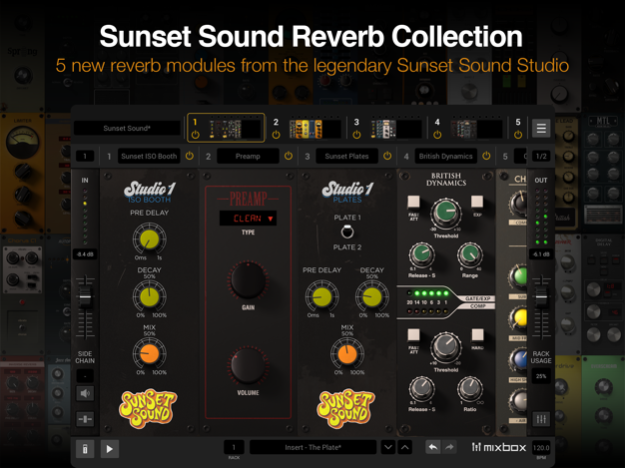

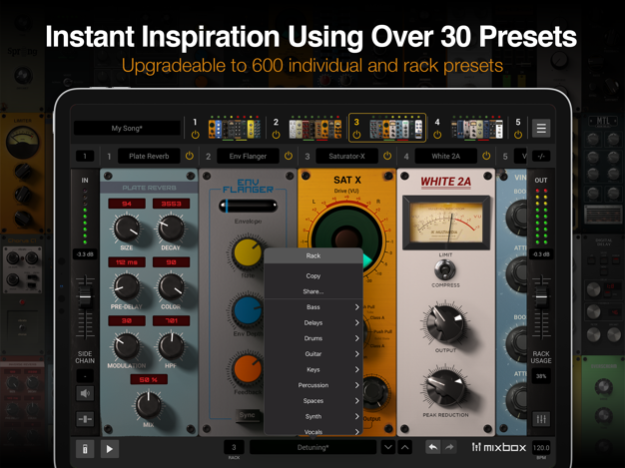
Limitless sonic options, now for iPad
MixBox CS packs 8 (upgradeable up to 77) award-winning mixing processors and creative effects into a convenient 500-series style iPad app.
Create, compare and save your own custom channel strips or multiFX chains, or choose from over 600 presets (with the Full version) to give your creativity a kickstart. Whether in your favorite host app or stand-alone, MixBox CS combines a massive range of effects and powerful workflow to supercharge your mixes.
Every processor offers immaculate sound, from powerful digital effects to warm, authentic physical models of classic analog gear. Divided into Amps, Channel Strips, Delays, Distortions, Dynamics, EQ, Filters, Modulations, Reverbs and Saturations, it’s easy to find just what you need. Derived from IK’s award-winning T-RackS, AmpliTube and SampleTank products, they offer the same professional sound quality in a convenient, portable app.
All processors can be inserted anywhere in the chain and are easily interchangeable. Each one comes with helpful controls and features for better mixing, production, and sound design.
MixBox is AUv3 compliant to work seamlessly with other music production and recording apps. It offers a freely configurable rack with slots for up to 8 processors, plus independent gain and mix controls, plus a sidechain control for dynamics processing*.
Standalone, MixBox is perfect for live mixing, allowing you to set up to 8 separate racks, each with up to 8 processors. Combine and assign these to your audio device’s inputs/outputs, adjust each one’s gain and level, and you’ll have a massive digital FX rack with up to 64 simultaneous FX. It includes a selection of built-in audio demos to use as reference tracks to audition any of the modules and presets.
To get you going quickly, MixBox CS offers a presets library containing more than 25 presets. By upgrading to the full version, you will unlock a comprehensive library of more than 600 presets covering everything from live mixing to sound design, for both individual processors and whole chains. You can also create and save your own presets for each individual module, the full rack, and even the whole app’s global state as a song.
With MixBox, you can enjoy supercharged mixes and FX, wherever you are.
Features
- Create your own custom channel strips
- Includes 8 effects modules. Upgradeable to over 71 FX from T-RackS, AmpliTube & SampleTank
- Dynamics, EQs, Filters, Modulation, Channel Strips, Saturation, Reverbs, Delays, Distortion and Amps
- 4 all-new algorithms for hall, room, plate and inverse reverbs
- Chain up to 8 processors in a single instance
- Lightning-fast workflow with all controls at your fingertips
- Save and recall entire chains, instantly
- Upgradeable to over 600 presets for every situation, including single processor and whole-chain presets
- Stand-alone hosts up to 8 full racks for live mixing
- Audio Player module for importing and playing back audio files
- Sidechain Compression via AU Multi-Bus*
- Wet/Dry FX control per module or Rack master
- AUv3 plug-in support
*Requires compressors only available in the paid full version.
Dec 23, 2024
Version 1.5.2
What’s New in v1.5.2.
-Improved compatibility with iOS 18
-Improved UI support in GarageBand, MixBox can now go full screen
-General reliability improvements
About MixBox CS
The company that develops MixBox CS is IK Multimedia US, LLC. The latest version released by its developer is 1.5.2. This app was rated by 1 users of our site and has an average rating of 1.5.
To install MixBox CS on your iOS device, just click the green Continue To App button above to start the installation process. The app is listed on our website since 2024-12-23 and was downloaded 35 times. We have already checked if the download link is safe, however for your own protection we recommend that you scan the downloaded app with your antivirus. Your antivirus may detect the MixBox CS as malware if the download link is broken.
How to install MixBox CS on your iOS device:
- Click on the Continue To App button on our website. This will redirect you to the App Store.
- Once the MixBox CS is shown in the iTunes listing of your iOS device, you can start its download and installation. Tap on the GET button to the right of the app to start downloading it.
- If you are not logged-in the iOS appstore app, you'll be prompted for your your Apple ID and/or password.
- After MixBox CS is downloaded, you'll see an INSTALL button to the right. Tap on it to start the actual installation of the iOS app.
- Once installation is finished you can tap on the OPEN button to start it. Its icon will also be added to your device home screen.
Program Details
System requirements
Download information
Pricing
Version History
version 1.5.2
posted on 2024-12-23
Dec 23, 2024
Version 1.5.2
What’s New in v1.5.2.
-Improved compatibility with iOS 18
-Improved UI support in GarageBand, MixBox can now go full screen
-General reliability improvements
version 1.5.1
posted on 2022-07-07
Jul 7, 2022 Version 1.5.1
What’s New in v1.5.1.
- New module pack available for purchase: Sunset Sound Reverb Collection
- An SE edition available for purchase, with upgrade path to Full
- Improved Preset Sharing - you can now import and export multiple presets at a time
- Fixed a bug that locked in-app purchases in standalone after going offline
version 1.3.3
posted on 2021-12-27
Dec 27, 2021 Version 1.3.3
What’s New in v1.3.3
- Fixed a bug that prevented the app from launching while offline
- Fixed an AUv3 bug that would cause menu UIs to not display properly
- Fixed an issue with AUv3 that resulted in “Missing or Invalid Plugin” errors when updating from v1.2.0 and earlier.
- Added MIDI compatible AUv3 plugin version
version 1.3.2
posted on 2021-12-10
Dec 10, 2021 Version 1.3.2
What’s New in v1.3.2
- MixBox CS is now a free app! Includes 8 FX modules and 30 rack presets
- Added “Upgrade to Full” in-app purchase
- General reliability improvements
